Stop Rekeying Between Systems.
A work order finishes on the floor and somebody types it into the ERP. A schedule changes in planning and somebody retypes it for the plant. The systems are not broken and neither is the person — the work of moving between them was simply never given to anything but a person.
The typing is the integration
Most plants running an ERP alongside an MES have already solved this, in the sense that the data does move. It moves because someone exports a list on Monday, reconciles it against a second screen, and pastes the result into a third. It moves because a supervisor keeps a spreadsheet that both systems quietly depend on. It moves because a planner stays late on the last working day of the month.
That arrangement has two costs, and the obvious one is the smaller. The hours are real, but the lag is worse: the ERP's picture of the floor is only as fresh as the last time a human refreshed it. Decisions made against it — promising a date, releasing a purchase, closing a period — are made against a version of the plant that stopped being true some hours ago.
FactoryThread gives that work to a Flow. Describe the sync in a sentence and the Flow appears: it reads the completed orders from the MES, matches them by work-order number, and writes the finish time and the status into the ERP. On a schedule you choose — every fifteen minutes, hourly, or once a night. Nobody rekeys anything, and nobody has to remember to.
The write is precise. The node names the column it matches on and the columns it sets, and nothing else in the row is touched — so the ERP record keeps every field your team, and every other integration, put there. You can add new rows, update the ones already there, match on a key and do both, or clear the target and replace it outright.
One sync is a demo. This is the estate.
A single work-order sync is easy to show and easy to underestimate. What an ERP manager actually inherits is an estate — a set of feeds, each with its own cadence, each with its own idea of what a part number looks like, all of which have to keep running on a Tuesday when nobody is watching.
| Feed | Direction | What it carries |
|---|---|---|
| Work orders | ERP → MES | Released orders land on the floor with their quantities, due dates and routing steps already attached. |
| Completions | MES → ERP | Finished quantities, scrap and actual finish times go back the other way, against the same work-order number. |
| BOMs | ERP → MES | Component lists and revisions, so the floor is never building to a superseded structure. |
| Routings and resources | ERP → APS | Operation sequences, setup and run times, and the machines allowed to do the work. |
| Supply and demand | ERP → APS | On-hand, on-order and forecast, so the schedule is planned against what will actually arrive. |
| Dispatch lists | APS → MES | The scheduled sequence per work centre, refreshed on the cadence the plant actually runs at. |
| Shift calendars | ERP → APS | Working patterns and planned downtime, so capacity reflects the shifts you are really staffing. |
Each of those is one Flow. Each was described in a sentence and then left alone. They do not share a runtime you have to tune, a broker you have to operate, or a warehouse you have to load first — the Flow reads the source when it runs and writes the target when it finishes.
Where two systems disagree about a value, the disagreement is handled in the Flow rather than in a person's head. A lookup resolves the plant's machine code to the ERP's resource id. A formula turns a status the MES spells one way into the one the ERP expects. A filter keeps orders that are genuinely finished from those merely reported. These are nodes on the graph, visible to whoever inherits the Flow next.
What it costs you to own
This is the question the demo never answers, and it is the only one an IT manager is really asking.
Nothing new to operate
There is no broker to run, no warehouse to load, and no agent on a server somebody has to remember to patch. Cloud, single-tenant, or self-hosted inside your own network — the same application code in all three.
No copy of your records
Rows are read when the Flow runs, transformed in an isolated worker, written where you asked, and discarded. We store your connection settings, your Flow definitions, and a record of each run — not your business data.
Credentials stay yours
A Connection is made once, against an account you provision and can revoke. Access is scoped by organization and workspace, with grants to users or teams and row-level security in the database underneath.
You can see what happened
Every run is recorded with its trigger, duration and outcome, and on failure the error that stopped it. When a sync did not land at 2am, the answer is a page, not an investigation.
And then you can see the thing you were retyping
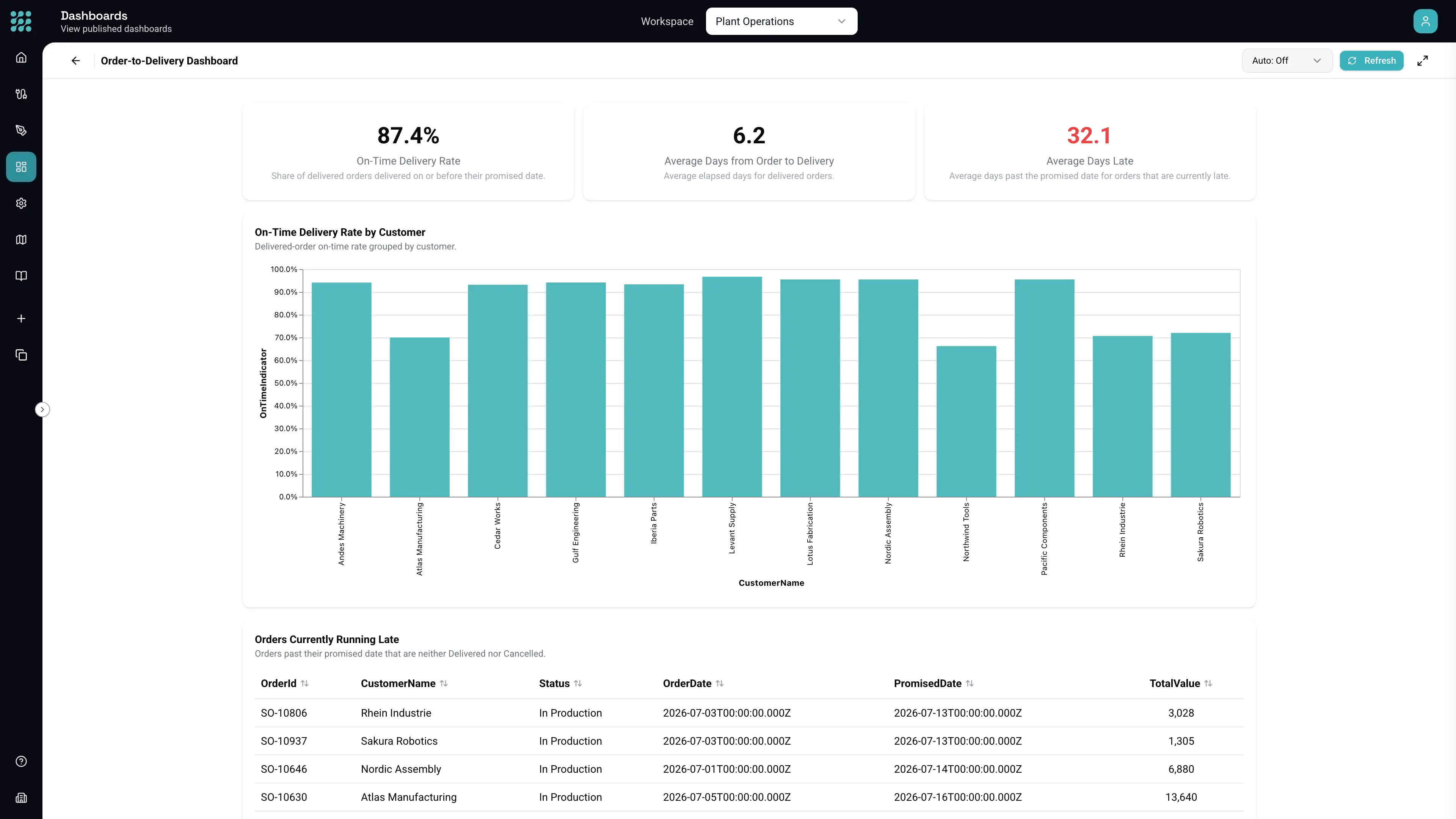
Once both systems are being read on a schedule, the question everyone gave up asking becomes cheap: how many orders are actually late, and whose? The same Connections that feed the sync feed a dashboard, built the same way, from a sentence.
Below is a published dashboard reading an ERP database and a logistics workbook together — on-time delivery by customer, average days late as a KPI that flags itself when it crosses the line, and the late orders listed underneath. It was not laid out by hand. Nobody set a width.