

The Manufacturing Reporting Problem
Every manufacturing executive wants the same thing: a dashboard showing real-time production status, OEE, quality metrics, and inventory levels. Every IT team faces the same challenge: getting data from MES, ERP, historians, and quality systems into Power BI or Tableau without building fragile point-to-point connections.
The typical approach looks like this:
- IT writes SQL queries against production databases
- Queries are scheduled to run overnight
- Results are dumped to CSV files or staging tables
- Power BI refreshes from these extracts
- By the time anyone sees the dashboard, the data is hours old
This works—barely. But it creates its own problems:
- Stale data: Dashboards show yesterday’s reality, not today’s
- Fragile queries: Direct database access breaks when systems upgrade
- IT bottleneck: Every new report requires IT involvement
- Inconsistent definitions: Different queries calculate OEE differently
There’s a better way.
What Is OData?
OData (Open Data Protocol) is a standardized way to expose data through REST APIs. Think of it as a universal language that business intelligence tools already speak.
Key characteristics:
- Standard protocol: Power BI, Excel, Tableau, and most BI tools have native OData support
- Query capability: Consumers can filter, sort, and aggregate data without custom code
- Self-describing: Tools can discover available fields and relationships automatically
- Web-based: Works over HTTP/HTTPS, no special drivers needed
When you expose manufacturing data through OData, any tool that speaks OData can consume it—without custom integration work for each tool.
Why OData for Manufacturing Data?
Real-Time Without Real Complexity
OData endpoints serve live data. When Power BI queries an OData feed, it gets current data—not yesterday’s extract. For production monitoring, this is the difference between seeing problems as they happen and discovering them in tomorrow’s morning meeting.
Self-Service for Business Users
With OData, business analysts can:
- Connect directly from Power BI or Excel
- Browse available data fields
- Build their own reports and dashboards
- Refresh data on demand
IT sets up the endpoint once. Business users create unlimited reports without IT involvement.
Consistent Data Definitions
When multiple reports pull from the same OData endpoint, they use the same data definitions. OEE calculated in the production dashboard matches OEE in the executive report. No more “which number is right?” debates.
Survives System Upgrades
OData is an abstraction layer. When the underlying MES or ERP upgrades, the OData endpoint can maintain the same structure. Downstream reports don’t break because they’re not coupled to database schemas.
Common Manufacturing OData Use Cases
Production KPI Dashboards
Expose real-time production metrics through OData:
- Units produced by line, shift, product
- OEE components (availability, performance, quality)
- Cycle times and takt time adherence
- WIP inventory by work center
Power BI connects to the OData feed and displays live metrics on shop floor monitors or executive dashboards.
Quality Reporting
Publish quality data for analysis:
- First-pass yield by product and line
- Defect Pareto (top defect types by frequency)
- SPC data and control chart values
- Non-conformance aging and disposition
Quality engineers build their own analyses without waiting for IT to write queries.
Inventory Visibility
Expose inventory positions across systems:
- Raw material availability by location
- WIP by production stage
- Finished goods by warehouse
- Material consumption vs. plan
Supply chain teams get real-time visibility without accessing production systems directly.
Maintenance Analytics
Publish equipment and maintenance data:
- Downtime events by equipment and reason code
- MTBF and MTTR by asset
- PM completion rates
- Spare parts consumption
Maintenance teams track equipment health through familiar BI tools.
How OData Integration Works
Traditional Approach (Without OData)
MES Database → Custom SQL Query → Scheduled Extract → Staging Table → Power BI ImportProblems:
- Every change requires IT work
- Data is stale by the time it’s visible
- Direct database access risks production system stability
- Different extracts define metrics differently
OData Approach
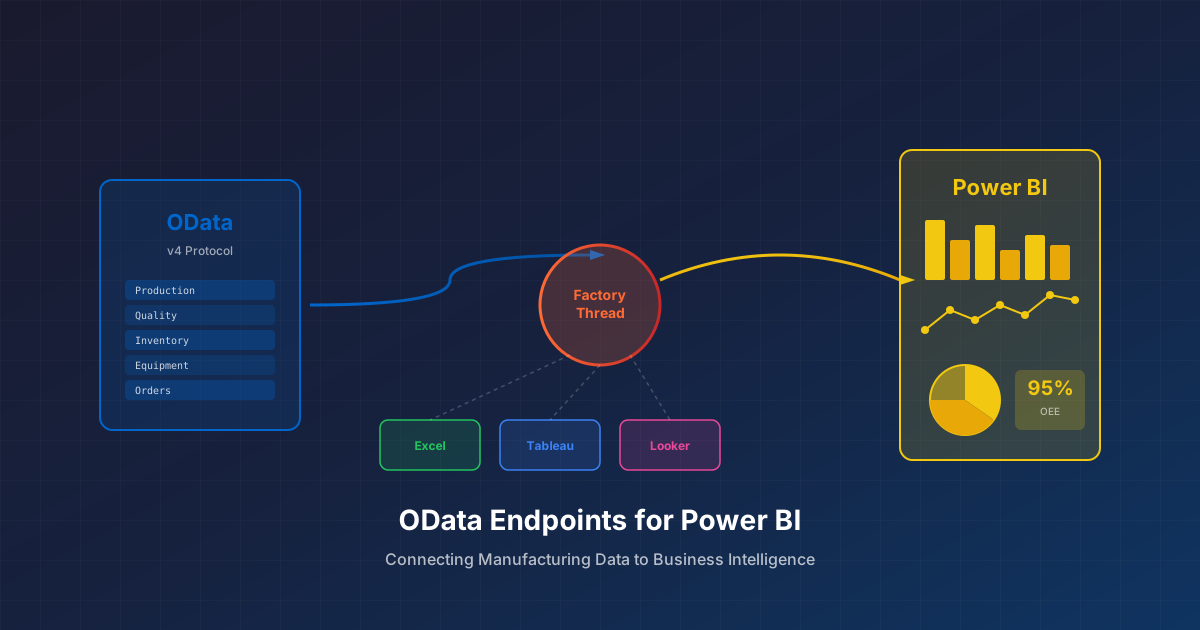
MES/ERP/Quality → Data Integration Platform → OData Endpoint → Power BI (Direct Query)Benefits:
- Changes to the endpoint don’t require Power BI changes
- Data is live (or near-live with caching)
- Production databases are protected
- Single source of truth for metrics
What Happens Behind the Scenes
- Data flows are defined that combine and transform data from source systems
- Transformations apply business logic (calculations, filtering, aggregation)
- Results are published as OData endpoints with defined refresh schedules
- BI tools connect using standard OData connectors
- Queries execute against the published data (with optional caching)
The integration platform handles the complexity of connecting to MES, ERP, and other systems. The OData endpoint provides a clean, standardized interface for consumers.
OData vs. Other Approaches
OData vs. Direct Database Connection
| Aspect | Direct Database | OData Endpoint |
|---|---|---|
| Data freshness | Real-time | Real-time or cached |
| Security | Database credentials exposed | Token-based, no DB access |
| Upgrade impact | High (schema changes break queries) | Low (endpoint abstracts schema) |
| IT involvement | Every report needs IT | Self-service after setup |
| Performance risk | Queries can impact production | Isolated from production |
OData vs. CSV/Excel Exports
| Aspect | CSV Exports | OData Endpoint |
|---|---|---|
| Data freshness | Stale (export age) | Real-time or near-real-time |
| Automation | Manual or scheduled scripts | Automatic refresh |
| Data consistency | Multiple versions proliferate | Single source of truth |
| Filtering/aggregation | Post-export in Excel | At query time |
OData vs. Custom APIs
| Aspect | Custom API | OData Endpoint |
|---|---|---|
| BI tool support | Requires custom connector | Native support |
| Query flexibility | Fixed endpoints | Consumer-driven queries |
| Development effort | High | Low (standard protocol) |
| Maintenance | Custom code to maintain | Standard implementation |
Implementation Considerations
Caching Strategy
OData endpoints can serve live data or cached results. Consider:
- Real-time: Best for current production status, active alarms
- Minute-level cache: Suitable for shift dashboards, KPIs
- Hourly cache: Appropriate for trend analysis, historical comparison
- Daily cache: Fine for month-over-month reports, strategic dashboards
Match cache duration to how often decisions are made from the data.
Data Granularity
Decide what level of detail to expose:
- Summary only: Aggregated metrics, smaller payloads, faster queries
- Transaction detail: Full flexibility, larger data volumes, slower queries
Often, you’ll want both—summary endpoints for dashboards, detail endpoints for drill-down.
Security and Access Control
OData endpoints should enforce:
- Authentication: Who can access the endpoint?
- Authorization: What data can each user see?
- Row-level security: Should plant managers see only their plant’s data?
Plan security before exposing production data through OData.
Performance at Scale
Power BI dashboards with many users can generate significant query load. Plan for:
- Caching to reduce query frequency
- Query timeouts to prevent runaway queries
- Rate limiting to protect infrastructure
- Monitoring to track usage patterns
Getting Started with OData for Manufacturing
Step 1: Identify High-Value Data
Start with data that’s:
- Requested frequently (IT gets repeat requests)
- Time-sensitive (stale data loses value)
- Used by multiple teams (broad impact)
Production status, OEE, and quality metrics are common starting points.
Step 2: Define the Data Model
Work with business users to define:
- What fields are needed?
- What calculations should be pre-computed?
- What filtering options are required?
- What’s the appropriate refresh frequency?
Document definitions so everyone agrees on what “OEE” or “on-time delivery” means.
Step 3: Build the Data Flow
Connect to source systems (MES, ERP, quality) and define transformations that produce the desired output. Apply business logic consistently.
Step 4: Publish as OData
Expose the transformed data as an OData endpoint. Configure caching and security appropriately.
Step 5: Connect from BI Tools
In Power BI:
- Get Data → OData Feed
- Enter endpoint URL
- Authenticate
- Select tables/entities
- Build visualizations
The data appears like any other data source—but it’s live, consistent, and self-service.
Beyond Power BI
OData isn’t just for Power BI. The same endpoints work with:
- Excel: Power Query can pull OData directly into spreadsheets
- Tableau: Native OData connector available
- SSRS: SQL Server Reporting Services supports OData
- Custom applications: Any HTTP client can consume OData
One endpoint, many consumers.
Common Pitfalls
Exposing Too Much Data
Just because you can expose everything doesn’t mean you should. Start focused, expand based on demand.
Ignoring Performance
A dashboard that takes 30 seconds to load won’t get used. Optimize for the queries users actually run.
Skipping Security Review
Manufacturing data can include sensitive information—recipes, process parameters, customer details. Review what’s exposed before opening access.
Forgetting About Maintenance
OData endpoints need monitoring, updates when source systems change, and periodic review. Plan for ongoing operations, not just initial deployment.
Ready to expose your manufacturing data through OData? See how FactoryThread publishes OData endpoints from MES, ERP, and quality systems—without custom development.