

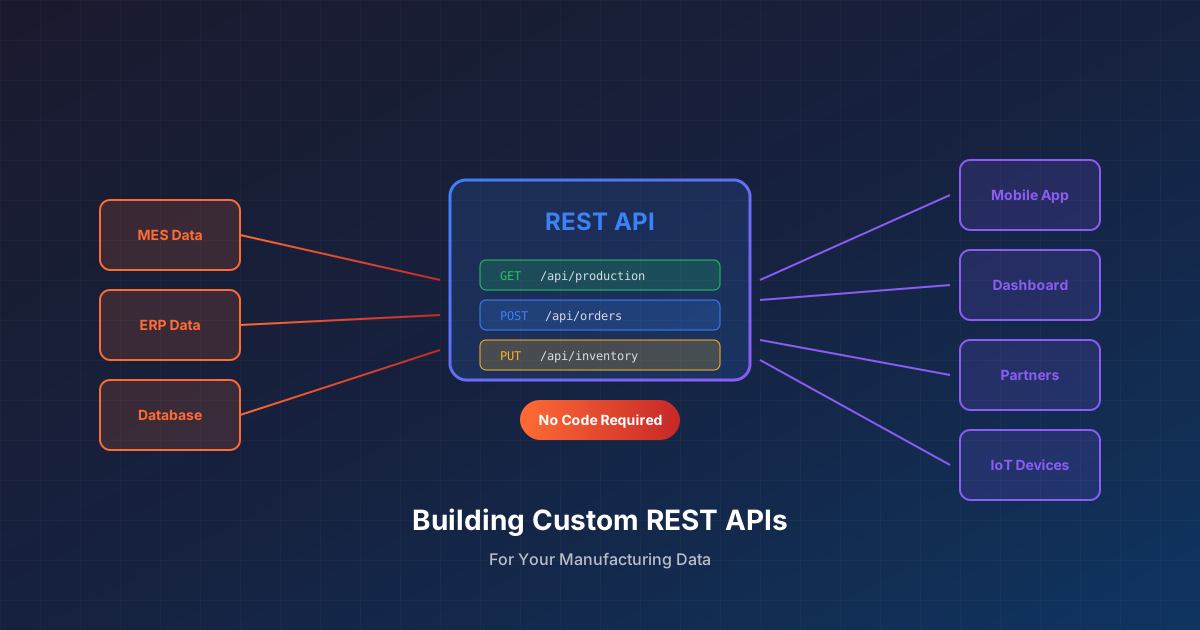
The Hidden API Problem in Manufacturing
Your MES vendor says their system “has APIs.” Your ERP has web services. Your quality system exposes data through SOAP. On paper, integration should be straightforward.
In practice, you discover:
- The APIs don’t expose what you actually need
- Endpoints require data transformations your consuming systems can’t do
- Authentication is complex and undocumented
- Performance is terrible at the volumes you need
- IT has a 6-month backlog for custom development
The result? Excel spreadsheets bridge the gaps. Manual processes fill the holes. Data moves via email and USB drives.
What if you could create your own APIs—exposing exactly the data you need, in the format consuming systems expect—without writing code?
What Are Custom REST APIs?
REST APIs are the standard way modern systems exchange data. When you check the weather on your phone, it’s calling a REST API. When your ERP sends data to a supplier portal, it’s using REST.
A custom REST API is an endpoint you define that:
- Accepts specific input parameters
- Pulls data from one or more source systems
- Transforms and combines data as needed
- Returns results in a defined format
The “custom” part means you control what data is exposed, how it’s structured, and who can access it—instead of being limited to what vendors provide out of the box.
Why Manufacturing Needs Custom APIs
Third-Party System Integration
Your customer wants production status updates in their portal. Your supplier needs consumption data for VMI replenishment. Your 3PL needs shipment details for label printing.
None of these systems care about your MES data model. They each want data in their specific format. Custom APIs let you:
- Translate your internal data structures to external formats
- Combine data from multiple systems into unified responses
- Control exactly what external parties can see
Mobile and Shop Floor Applications
Operators need to scan a work order and see:
- Current routing step
- Required materials and quantities
- Quality specifications
- Recent inspection results
This data lives across MES, ERP, and quality systems. A custom API can aggregate it into a single call, making mobile app development straightforward.
Machine and IoT Integration
Edge devices and PLCs increasingly support REST API calls. A custom API can:
- Receive production counts from automated equipment
- Validate work orders against MES data
- Return current production parameters
- Trigger downstream processes based on machine events
Partner and Customer Portals
B2B portals need manufacturing data:
- Order status and promised dates
- Quality certifications and CoAs
- Lot genealogy and traceability data
- Inventory availability
Custom APIs expose exactly what partners need—nothing more, nothing less.
The No-Code Approach to API Creation
Traditional API development requires:
- Backend developers who understand the data sources
- API framework knowledge (Express, FastAPI, etc.)
- Security implementation (OAuth, API keys)
- Infrastructure for hosting and scaling
- Ongoing maintenance and monitoring
No-code API creation replaces this with:
- Visual data flow design: Define where data comes from and how it transforms
- Parameter mapping: Specify what inputs the API accepts
- Response schema definition: Declare the output structure
- One-click publishing: Deploy the endpoint with built-in security
The result is a production-ready API endpoint that non-developers can create and modify.
How Visual API Design Works
Step 1: Define the Input
What parameters will callers pass to your API?
Example: An API that returns work order details might accept:
workOrderNumber(required): The work order to look upincludeHistory(optional): Whether to include historical operations
These become query parameters or request body fields in the published API.
Step 2: Build the Data Flow
Using visual design tools, you define:
- Source connections: Which systems to query (MES, ERP, quality)
- Data retrieval: What data to pull from each source
- Transformations: How to combine, filter, and reshape the data
- Parameter injection: Where input parameters affect the queries
Example flow for work order details:
- Query MES for work order header using
workOrderNumberparameter - Query MES for operation list
- Query ERP for material requirements
- Query quality system for specifications
- Combine results into unified response
Step 3: Define the Response
Specify the structure of API responses:
- What fields are returned
- Data types for each field
- Nested objects and arrays
- Error response formats
The visual designer validates that your data flow produces the defined response structure.
Step 4: Publish and Secure
With one click, the API becomes available:
- Unique endpoint URL generated
- Authentication configured (API key, OAuth, etc.)
- Rate limiting applied
- Monitoring enabled
Callers can immediately start using the endpoint.
Real-World Use Cases
Work Order Status API
Purpose: Let customer portals check production status
Endpoint: GET /api/workOrderStatus?orderNumber=WO-12345
Response:
{
  "orderNumber": "WO-12345",
  "customerPO": "PO-98765",
  "product": "Widget-A",
  "quantityOrdered": 1000,
  "quantityCompleted": 750,
  "currentOperation": "Final Assembly",
  "estimatedCompletion": "2025-04-03T14:00:00Z",
  "qualityStatus": "Passed"
}
Data sources: MES (order details, completion), ERP (customer PO), Quality (status)
Material Availability API
Purpose: Let shop floor apps check if materials are ready
Endpoint: POST /api/materialCheck
Request body:
{
  "workOrder": "WO-12345",
  "operation": "10"
}Response:
{
  "ready": true,
  "materials": [
    {"partNumber": "RM-001", "required": 100, "available": 150, "location": "BIN-A12"},
    {"partNumber": "RM-002", "required": 50, "available": 50, "location": "BIN-B07"}
  ]
}
Data sources: MES (BOM), ERP (inventory positions)
Quality Certificate API
Purpose: Let customers download quality documentation
Endpoint: GET /api/qualityCert?lotNumber=LOT-789
Response:
{
  "lotNumber": "LOT-789",
  "product": "Widget-A",
  "manufactureDate": "2025-03-28",
  "inspections": [
    {"test": "Dimensional", "result": "Pass", "value": "10.02mm", "spec": "10.00 ± 0.05mm"},
    {"test": "Visual", "result": "Pass", "inspector": "J. Smith"}
  ],
  "certificateUrl": "https://..."
}
Data sources: Quality system (inspections), MES (lot genealogy)
Production Count API
Purpose: Let PLCs or edge devices report production counts
Endpoint: POST /api/productionCount
Request body:
{
  "equipmentId": "LINE-01",
  "workOrder": "WO-12345",
  "quantity": 25,
  "timestamp": "2025-04-02T10:30:00Z"
}Response:
{
  "recorded": true,
  "totalCompleted": 775,
  "remainingQuantity": 225
}Action: Writes to MES, returns updated totals
Benefits of No-Code API Creation
Speed
Traditional custom API development takes weeks or months. No-code approaches deliver working endpoints in hours or days. When a customer asks for data access, you can respond quickly.
Flexibility
Business requirements change. New partners need different data formats. No-code APIs can be modified without development cycles—adjust the flow, republish, done.
Reduced IT Burden
IT teams are stretched thin. No-code API creation empowers operations, supply chain, and manufacturing teams to create their own integrations. IT focuses on infrastructure and security, not every data request.
Consistency
APIs built on the same platform follow consistent patterns for authentication, error handling, and monitoring. Consumers learn one approach that applies to all endpoints.
Maintainability
Visual flows are easier to understand than code. When the person who built an integration moves on, others can see what it does and modify it.
Security Considerations
Authentication
Custom APIs should require authentication:
- API keys: Simple, suitable for server-to-server
- OAuth 2.0: More secure, supports user-level permissions
- JWT tokens: Stateless, good for microservices
No-code platforms typically handle authentication implementation—you just configure who can access what.
Authorization
Not everyone should see everything:
- Endpoint-level: Who can call this API at all?
- Data-level: What subset of data should each caller see?
Example: A customer can query their own orders but not other customers’ orders.
Rate Limiting
Protect your systems from abuse or runaway processes:
- Limit calls per minute/hour
- Apply different limits to different callers
- Return clear errors when limits are exceeded
Audit Logging
Know who called what and when:
- Log all API calls
- Record parameters and response codes
- Retain logs for compliance requirements
Performance Optimization
Caching
For data that doesn’t change frequently, cache responses:
- Reduce load on source systems
- Improve response times for consumers
- Configure cache duration based on data volatility
Query Optimization
Design data flows efficiently:
- Only query fields you need
- Filter at the source, not after retrieval
- Use appropriate indexes in source systems
Pagination
For APIs returning large datasets:
- Return results in pages
- Let callers specify page size and number
- Include total count for UI pagination
Monitoring and Operations
Once APIs are published, monitor:
- Availability: Is the endpoint responding?
- Latency: How fast are responses?
- Error rates: How many calls fail?
- Usage patterns: Who’s calling, how often?
Good platforms provide dashboards showing API health and usage trends.
Getting Started
Identify the First Use Case
Look for:
- Frequent requests for data from external parties
- Manual processes bridging systems
- Mobile or shop floor apps waiting on “integration”
Pick something specific and valuable—not “expose all MES data.”
Define the Contract
Before building:
- What inputs does the API accept?
- What output does it return?
- What error cases exist?
- Who will call it and how often?
Document this “API contract” with stakeholders.
Build and Test
Create the data flow, define the response, publish the endpoint. Test with realistic scenarios:
- Valid inputs
- Invalid inputs
- Edge cases (missing data, large responses)
- Performance under load
Deploy and Monitor
Roll out to initial consumers. Watch for issues. Gather feedback. Iterate.
Ready to create custom APIs for your manufacturing data? See how FactoryThread enables no-code API creation from MES, ERP, and quality systems.